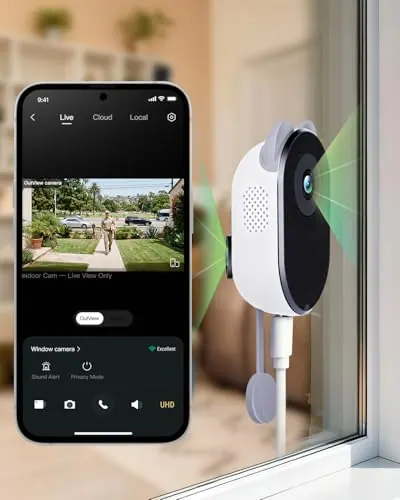
W101 Window Camera
A dual-lens indoor window camera that monitors outdoors through glass without drilling.
Explore W101 Window Camera →
2 product families
Botslab security cameras support flexible home monitoring from indoor windows to outdoor multi-camera coverage. Our category includes the W101 Window Camera, designed for no-drill viewing through glass, and the W510 Solar Security System, which combines modular cameras with an H200 base station and local storage. When comparing Botslab Security Cameras, consider the area you want to view, indoor or outdoor placement, resolution, camera movement, power method, Wi-Fi compatibility, storage, and the number of cameras needed. Review each model's verified configurations and included components to choose a setup that fits the property without assuming every camera uses the same installation or recording approach.
Compare the range
Each page keeps related ASINs together only where the model and configuration evidence match.
A dual-lens indoor window camera that monitors outdoors through glass without drilling.
Explore W101 Window Camera →
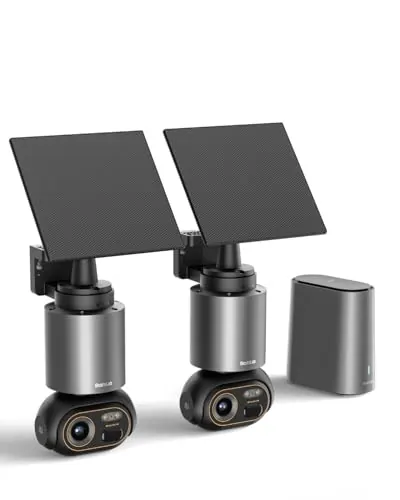
A modular 4K solar camera system with 360° tracking and private local storage through the H200 base station.
Explore W510 Solar Security System →Questions about the category
Use these quick answers to compare the category before opening a specific product page.
The best security camera is the one that matches the area, placement, power, movement, and storage you need. Botslab's W101 monitors outdoors through an indoor window without drilling, while the W510 system supports modular outdoor solar cameras, 360-degree tracking, and local base-station storage. Compare the exact installation and coverage approach before choosing a model.
Install security cameras according to the placement and power method of the exact model. The Botslab W101 mounts indoors against a window for no-drill outdoor viewing, while W510 configurations use outdoor camera placement with solar-ready power and an H200 base station. Confirm Wi-Fi reach, viewing angle, mounting surface, included hardware, and app setup before final placement.
To clean a security camera, gently remove dust or spots from the lens with a clean, soft microfiber cloth and follow the model's care instructions. Avoid abrasive cleaners and do not force moisture into seams, ports, or power connections. For a window-mounted W101, also keep the indoor glass area clear so the camera's through-glass view is not obstructed.
Security camera prices vary by camera type, kit size, power method, storage, and included components. Botslab product pages show the current confirmed price for each exact W101 or W510 configuration when available. Compare the single window camera, W510 add-on camera, and multi-camera kits, then confirm final price, availability, and included items at the matching purchase destination.
Security cameras keep footage for different lengths of time depending on storage capacity, recording settings, and the amount of activity captured. The Botslab W510 uses private local storage through its H200 base station, which includes 32GB and supports expansion. Review the exact model's storage specifications and current app settings to understand how they affect available recording history.